![TT Logo.png]](https://25843872.hs-sites-eu1.com/hs-fs/hubfs/TT%20Logo.png?height=50&name=TT%20Logo.png)
1. Check Your Invitation Email
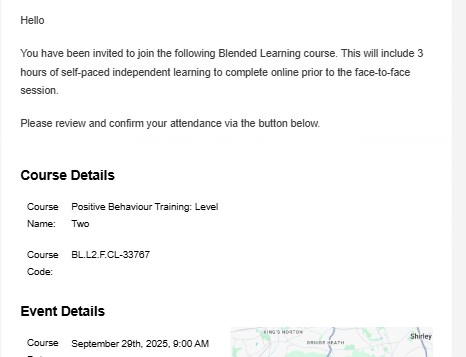
You will receive an email asking you to accept or decline your training invitation.
This email will include:
-
-
Course name and identification code
-
Date and time of the training
-
Training location
-
Blended Learning course information
-
2. Respond to the Invitation
-
-
Click ‘Respond to Invitation’.
-
Review the course details.
-
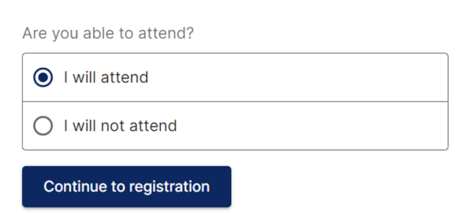
Select:
-
‘I will attend’ to confirm your place, or
-
‘I will not attend’ to decline (you’ll be asked to provide a reason).
-
-
Then click ‘Continue to Registration’.
3. Register for a Team Teach Connect Account
If you don’t already have an account, you’ll be prompted to create a free one.
For help with registration, see: Registering for Connect
4. Complete Your Health & Safety Consent Form
After confirming your place, you’ll be directed to complete:
-
-
The Health & Safety Consent Form
-
5. Access the GO1 Online Learning Platform
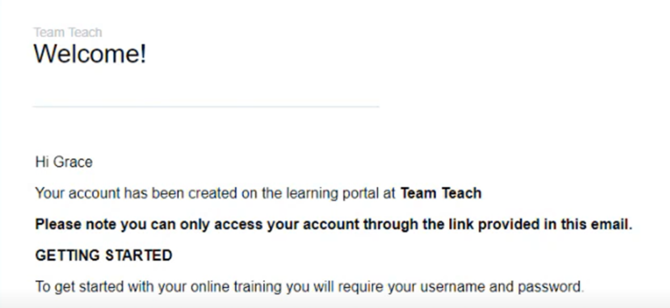
You’ll receive a separate onetime login email from noreply@mygo1.com with instructions to:
-
-
Register for GO1
-
Set your password
-
Access your online learning dashboard
-
Follow the instructions in the email carefully to log in and begin your course.
6. Start Your Online Learning
Once you’ve logged into GO1:
-
-
Begin the online portion of your Blended Learning course.
-
Your trainer will be notified once your training is in progress and once it is complete.
- Our online self-guided modules are independent and self-paced learning, so you can finish a module and come back to the learning at a more convenient time.
- You must make sure you complete the learning before the face-to-face training.
-
7. View Your Course in Connect
Your course details will automatically appear under the ‘My Courses’ tab at the top of your Team Teach Connect dashboard.