![TT Logo.png]](https://25843872.hs-sites-eu1.com/hs-fs/hubfs/TT%20Logo.png?height=50&name=TT%20Logo.png)
If you’re no longer able to attend a Team Teach training course, you can cancel your place by following the steps below.
1. Access Your Course Information
-
Click the ‘My Courses’ tab in the top navigation panel.
-
-
Locate the course you’re currently booked on and select the course name to view its details.
-
2. Request a Cancellation
-
Click ‘Change My Attendance’.

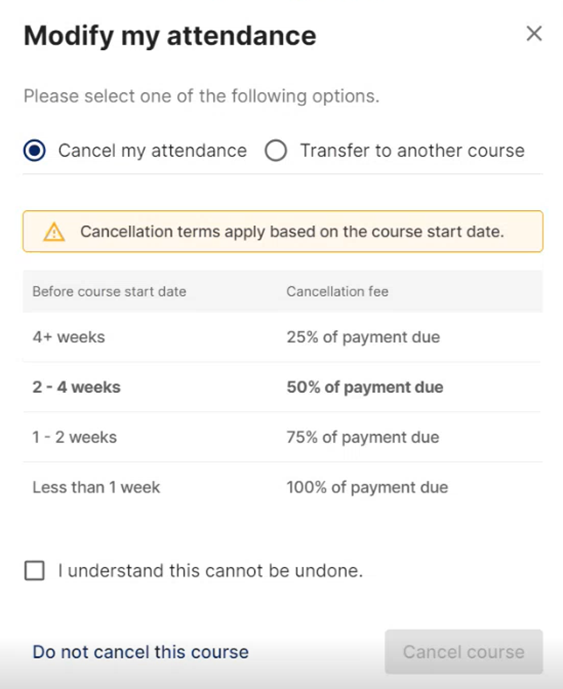
A pop-up window will appear with two options:
-
Cancel your attendance
-
Transfer to another course
If you would prefer to transfer, see our guide: Transferring a Training Course
3. Cancel Your Attendance
-
Select ‘Cancel My Attendance’.
⚠️ Important: Cancellation terms apply based on the course start date. A cancellation fee may be charged in accordance with our Terms of Business.
4. Confirm Cancellation
-
Tick the checkbox to confirm that you understand cancelling your place cannot be undone.
-
Click ‘Cancel Course’ to finalise your cancellation.
5. Confirmation
-
You’ll receive an email confirmation of the cancellation.
-
The course will automatically be removed from your ‘My Courses’ tab in Team Teach Connect.