![TT Logo.png]](https://25843872.hs-sites-eu1.com/hs-fs/hubfs/TT%20Logo.png?height=50&name=TT%20Logo.png)
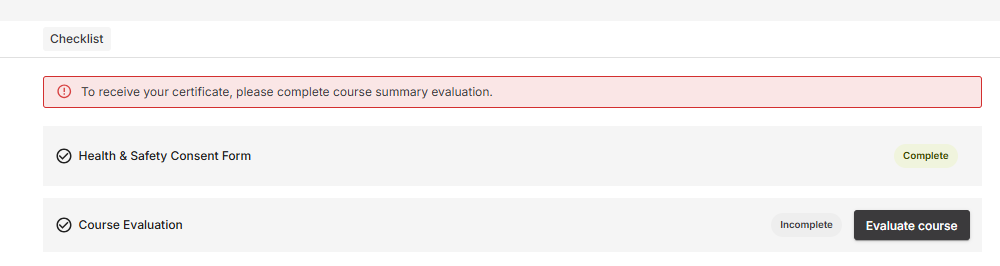
⚠️ Important: Your certificate will not be issued until the following steps are completed:
Your Health & Safety Consent Form is submitted
You have completed your Course Evaluation
Your trainer has awarded a pass grade
Please note: The Course Evaluation is separate from the optional training survey you may also receive.
On the final day of your training, once the trainer has marked your attendance, you will receive an email notification prompting you to complete your Course Evaluation.
-
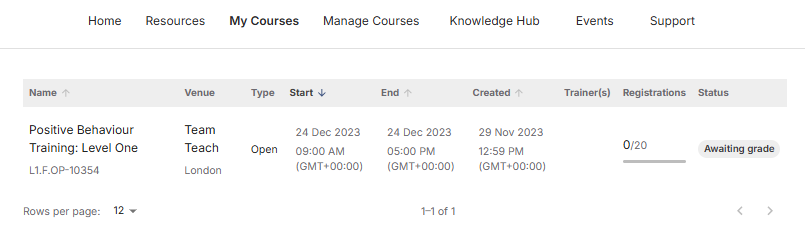
Go to ‘My Courses’
-
Log into Team Teach Connect
-
Click ‘My Courses’ in the top navigation bar
-
-
Select Your Training Course
-
Click the name of the course requiring evaluation
-
-
Begin Evaluation
-
Click ‘Evaluate Course’
-
-
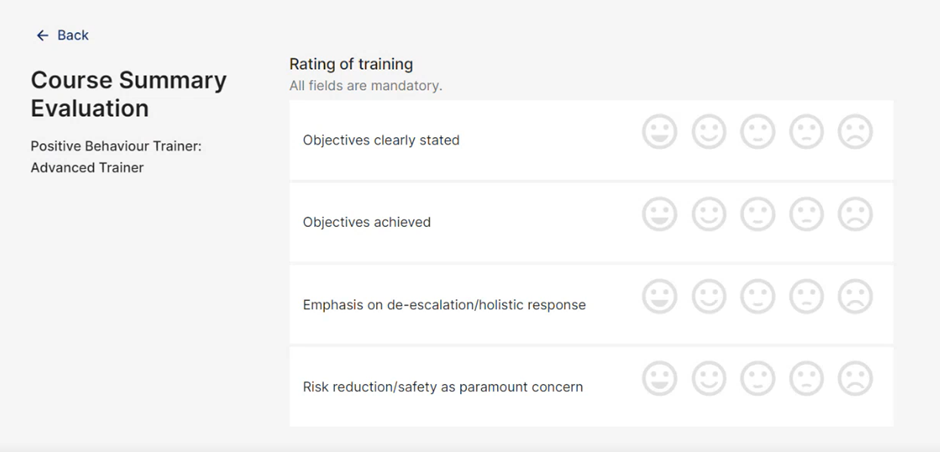
Rate the Training
-
You’ll be asked to rate various aspects of the course
-
Select a face icon (e.g. happy, neutral, unhappy) to provide your feedback
-
-
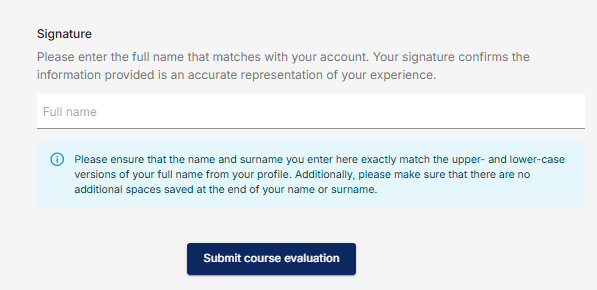
Sign the Form
-
Enter your full name in the signature field to confirm your responses
-
-
Submit Your Evaluation
-
Click ‘Submit Course Information’
-
What Happens Next?
-
Once your trainer has graded the course and you’ve received a pass, your certificate will be automatically added to your Team Teach Connect profile
-
You can view and download your certificate from your user profile once it becomes available