![TT Logo.png]](https://25843872.hs-sites-eu1.com/hs-fs/hubfs/TT%20Logo.png?height=50&name=TT%20Logo.png)
For more details on how to prepare for your course, please see the article: Preparing for Your Training Course
When to Complete the Form
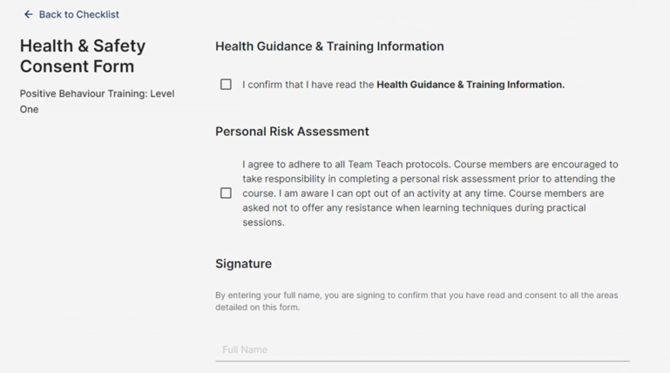
Once you’ve accepted a place on a training course, you’ll be prompted to fill in the Health and Safety Consent Form as part of the registration process.
-
Read the Health Guidance and Training Information
Carefully review the information provided to ensure you understand any health and safety considerations. -
Confirm You’ve Read the Guidance
Tick the box to confirm you’ve read and understood the Health Guidance and Training Information. -
Agree to the Personal Risk Assessment
Tick the second box to confirm you agree with the Personal Risk Assessment. -
Sign the Form
Enter your full name to sign the form.Make sure the name matches the one used for your Team Teach Connect account.
-
Submit the Form
Click ‘Submit Form’ to finalise your registration for the course.
Optional: Update Your Personal Profile
You can also update your profile on Team Teach Connect to include:
-
Dietary requirements
-
Any disabilities or accessibility needs
This helps us ensure appropriate support is in place during your training.
For step-by-step instructions, see the article: Editing Your Profile