![TT Logo.png]](https://25843872.hs-sites-eu1.com/hs-fs/hubfs/TT%20Logo.png?height=50&name=TT%20Logo.png)
Before inviting participants to a course, you will need to create the course and add the course content. Please refer to the articles in our Course Creation folder showing you how to create a course and use the course builder tool for more information:
-
Go to 'My Courses'
Click the ‘My Courses’ tab in the navigation panel at the top of your screen to view your course list. -
Open Course Details:
Click on the name of the course you want to manage to open its details. -
View Attendees:
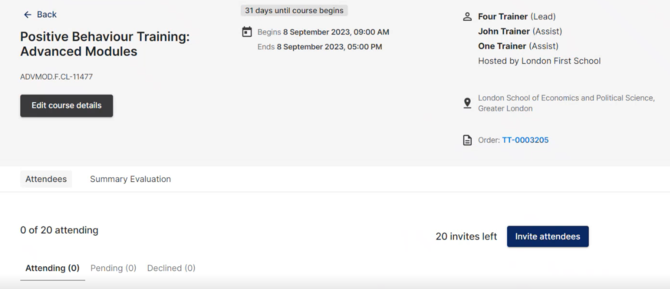
Select the ‘Attendees’ tab. Here, you’ll see:-
Confirmed attendees
-
Pending invites (sent but not yet accepted)
-
Declined invitations
-
The number of remaining invitations available
-
-
Invite Attendees:
Click the ‘Invite Attendees’ button. -
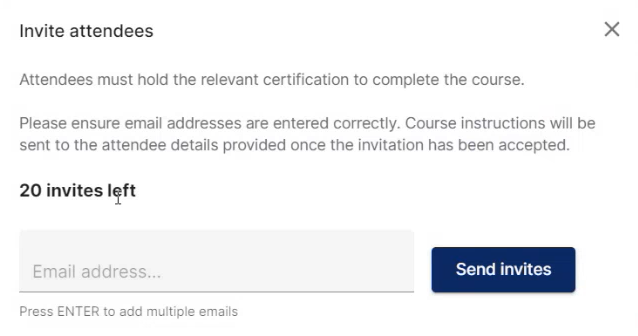
Enter Email Addresses:
Type in the participant’s email address. Please double-check that:-
It’s spelled correctly
-
It belongs to the individual participant (not a shared or central office inbox)
Course invitation and instructions will be sent to this address.
You can:
-
Add emails one at a time by pressing Enter after each one
-
Paste multiple addresses at once, separated by spaces or commas, and pressing Enter
-
-
Send Invitations:
Click ‘Send Invites’ to email participants their course invitation.
Each person will receive:-
Course details
-
A link to accept or decline the invitation (this must be completed before the training begins)
-
-
Track Invitation Status:
You’ll be returned to the course overview where each invite will be shown as:-
Attending
-
Pending
-
Declined
-
You can resend an invitation by clicking ‘Resend Invite’, or cancel it by selecting ‘Cancel Invite’.
Further Information:
When you invite participants to your course, they will receive an invitation prompting them to accept the invite.
- Upon acceptance, they will be directed to a confirmation screen to confirm their attendance.
- After confirming, participants will be required to complete a Health & Safety declaration, which will automatically update within your course records. Completion of this step is mandatory for certification at the end of the course.
- Additionally, participants will receive an email prompting them to complete a pre-training survey. This survey helps establish their baseline knowledge before attending the course.