![TT Logo.png]](https://25843872.hs-sites-eu1.com/hs-fs/hubfs/TT%20Logo.png?height=50&name=TT%20Logo.png)
1. Go to the Connect Login Page
Use the registration link provided to navigate to the Team Teach Connect login page.
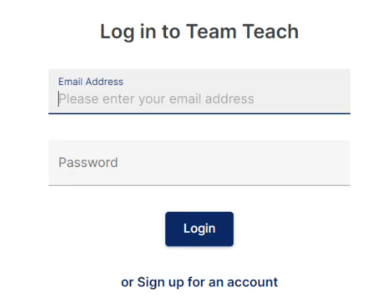
2. Start the Sign-Up Process
Below the login fields, click ‘Sign up for an account’.
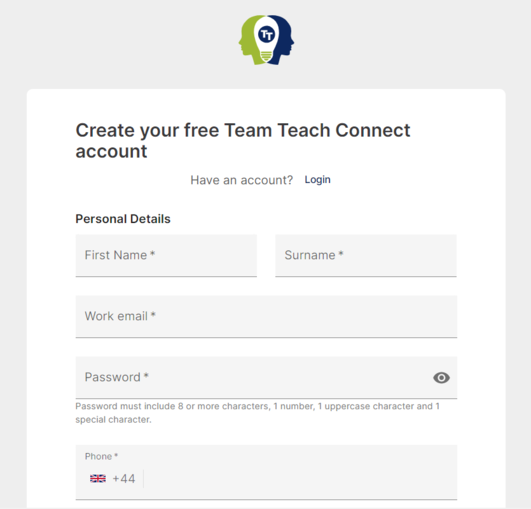
3. Enter Your Personal Details
Complete the registration form with the following information:
-
-
First name
-
Surname
-
Work email address
-
Residing country
-
Phone number
-
Residing organisation
-
Job title
-
4. Create a Password
Set a secure password. It must:
-
-
Be at least 8 characters long
-
Include at least one uppercase letter
-
Include at least one number
-
Include at least one special character (e.g., !, @, #)
-
6. Accept the Terms
-
-
Tick the box to confirm you agree to our Terms of Use and Privacy Policy.
-
7. Complete the reCAPTCHA
-
-
Tick the reCAPTCHA box to confirm you’re not a robot.
-
8. Create Your Account
Click ‘Create Account’ to submit your details.
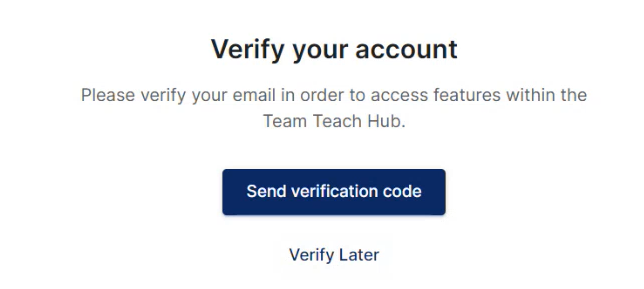
9. Verify Your Email Address
To activate your account, you’ll need to verify your email:
-
-
Click ‘Send Verification Code’
-
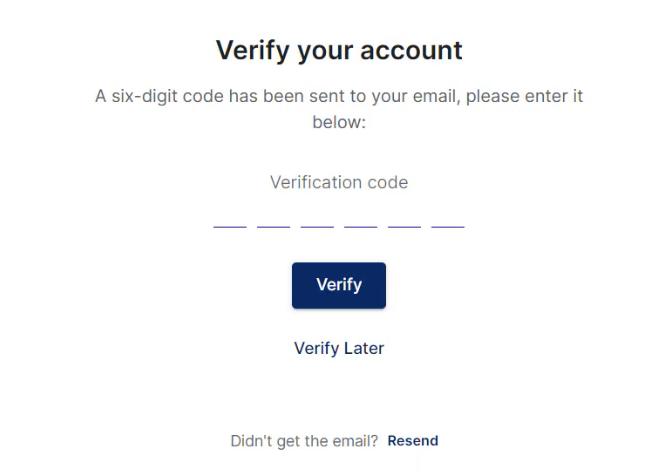
A 6-digit code will be emailed to the address you provided
-
Copy and paste or type the code into the Verification Code field
-
Click ‘Verify’
-